Border Design for Project Work and Easy Front Page Ideas
A neat border design gives your school project file and assignment sheets a clean, finished look. You can draw simple and beautiful borders using basic stationery like a regular 30 cm ruler, pencil, sketch pens, and highlighters. This guide provides easy border patterns and front-page layout ideas for subjects like Science, Social Science, English, and Computers for classes 6 to 10.
Videos on this topic
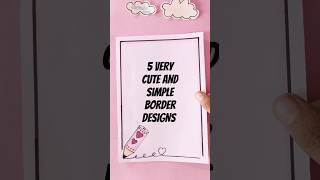 Border Design for Project: 5 Easy Project Work Designs
 Social Project Front Page Design for Class 6-10
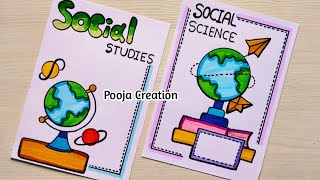 social project work designs | Social science project front page | sst project front page design |sst
 Science, Chemistry, Biology Project Design/ Physics Border Designs/ Project Work Designs #shorts
 science projects|science project ideas|science front page design |project designs #shorts #science
 science project | science border design for project | front page decoration for science notebook
 Science Project Front Page Design for Class 6 & 7
 Project work designs easy and beautiful//border design for project #shortsfeed
Popular and Easy Border Design Patterns
You do not need complex art skills to draw a border. Using repeating geometric lines, floral vine corners, or ribbon frames makes your page look attractive in just a few minutes.
- Use a pencil and scale to draw faint guidelines before using ink.
- Leave at least 1.5 cm space on the left margin for file punching or stapling.
- Keep the design symmetric on all four corners for a balanced look.
| Design Name | How to Draw the Pattern | Best Subject / Use | Recommended Colours |
|---|---|---|---|
| Double Line Ribbon | Two straight lines connected by small diagonal slants at corners | English, Hindi, Essays | Navy Blue, Dark Green |
| Simple Leaf Vine | A thin wavy line with tiny alternating oval leaves | Biology, Environmental Studies | Light Green, Dark Green |
| Corner Floral Box | Clean straight border with 3 small flower petals in each corner | Moral Science, Art, General Files | Red, Yellow, Black |
| Geometric Zigzag | Repeating small triangles or chevron peaks along the inner edge | Maths, Physics, Geometry | Orange, Black |
| Wavy Ribbon Border | A smooth continuous S-curve wave framed by two straight margin lines | Social Science, Geography | Brown, Sky Blue |
| Dotted Dash Chain | Alternating long line dashes and small round dots with a sketch pen | Quick Class Assignments | Dark Blue, Purple |
| Circuit Line Pattern | Right-angled lines ending in tiny hollow circles at the turns | Computer Science, Robotics | Cyan, Black, Silver |
| Scroll Banner Edge | Curved ribbon turns at the top and bottom corners | History, Civics | Golden Yellow, Brown |
| Atom & Bubble Border | Tiny circles and orbiting ring shapes linked by thin straight bars | Chemistry, General Science | Sky Blue, Pink |
| Greek Key Maze | Continuous interlocking square spiral lines along the page edges | Social Studies, History | Terracotta Red, Black |
| Highlighter Block Border | Thick line drawn with a chisel-tip highlighter topped with a thin black pen line | Weekly Homework, Practical Files | Pastel Green, Pastel Yellow |
Front Page Design for Social Science (SST) Projects
Social Science projects cover History, Geography, and Civics. Your front page should reflect these themes using warm, earthy colours and neat title lettering.
- History Projects: Draw an ancient scroll banner for your title. Use brown and golden shades. Add small corner motifs like pillars, monument outlines, or antique stamps.
- Geography Projects: Draw a simple globe outline or compass rose at the bottom right. Use green and blue borders representing land and water.
- Civics & Economics: Keep the design formal with clean double-line borders in navy blue or dark green. You can draw a small outline of the Indian Parliament building or Ashoka Chakra motif at the top centre.
Front Page Design for Science Projects
Science cover pages look best with clean lines, technical diagrams, and bright, focused colours. You can create separate styles for Physics, Chemistry, and Biology.
- General Science: Draw a border with small laboratory flasks, magnifying glasses, and light bulb icons in alternating corners.
- Biology / EVS: Use leaf veins, plant roots, or DNA spiral borders along the left and right sides. Keep green and yellow as the main colour scheme.
- Physics & Chemistry: Use circuit lines, magnetic field lines, atom orbits, or test tubes with rising bubbles along the outer margin.
- Title Placement: Write the project topic in bold block letters inside an oval or rectangular centre box.
Front Page Design for English and Computer Projects
Language and technology subjects need distinct styles to match their topics.
- English Projects: Draw an open book or feather quill pen near the bottom corner. Frame the page with a clean double ribbon border.
- Computer Projects: Use a digital or circuit theme. Draw straight lines that turn at 90-degree angles with small circles at the joints, resembling a printed circuit board (PCB) or binary digits (0 and 1) along the border.
How to Layout the Details on a School Project Front Page
Teachers look for specific details on the cover page. Make sure all text is legible and properly spaced from top to bottom.
- Top Area: School Name (written in bold capital letters or curved text).
- Upper Middle Area: Subject Name and Academic Session (for example: Social Science Project - 2024-25).
- Center Area: Main Project Title (drawn inside a decorative box or highlighted banner in large font).
- Bottom Left: Submitted By details (Your Name, Class, Section, Roll Number, and Admission Number).
- Bottom Right: Submitted To details (Teacher Name and Designation).
Common questions
- What basic stationery is needed for project border designs?
- You need a standard 30 cm ruler, an HB pencil, an eraser, a black gel pen or fine liner for outlines, and a set of sketch pens or colour pencils for filling.
- How much margin should I leave for punching file holes?
- Always leave at least 1.5 cm to 2 cm of blank space on the left side of an A4 sheet so that file holes or clips do not cut through your border design.
- How can I stop sketch pen ink from bleeding through the paper?
- Use 80 to 100 GSM A4 assignment sheets or chart paper instead of very thin notebook paper. Alternatively, use colour pencils or fine-tip gel pens instead of wet markers.
- What is the quickest border design for a last-minute assignment?
- The fastest border is the highlighter line topped with a dashed black pen line. Draw four straight lines using a highlighter and ruler, then draw small black pen dashes directly over the colour.
- Can boys and girls use the same border designs?
- Yes. Geometric patterns, double lines, circuit boards, and clean ruler-drawn borders look neat and professional on any student project file regardless of gender.